


LVS Converge+

WHAT IS CONVERGE+

The Smarter Way to Capture Leads and Measure Event Success

Converge+ is your event lead capture solution, combining easy-to-use lead scanning with detailed post-event lead data to help your team engage prospects, prioritize follow-up, and maximize event ROI.

Converge+ makes it easy to capture lead details, notes, and voice recordings at the event, then delivers your leads in a comprehensive export file to support timely and targeted follow-up.

Yes. You can request a demo or preview of Converge+ by contacting lvsouvenir.es@clarionevents.com.

ORDERS & LICENSING 

Manage Scan Licenses for Your Team 

Once your company admin has logged in to the setup website, they will see the number of licenses available. If you need this information before setup is open, contact lvsouvenir.es@clarionevents.com.  

Additional licenses can be purchased up until the event. We recommend purchasing early to allow time for setup and team assignment. 

No. Licenses cannot be transferred between employees. If needed, contact lvsouvenir.es@clarionevents.com to discuss available options. 

No. Unused licenses are non-refundable. 

Refunds are subject to event policies and timing. Please contact your Exhibitor Services Manager at lvsouvenir.es@clarionevents.com. 

SETUP & ACCESS

Get Set up Quickly and Confidently

The setup takes just a few minutes.  

Once your company admin receives access, they can: 

  • Assign scan licenses to onsite team members (required) 

  • Add up to 3 Lead Qualifying Questions (optional) 

  • Create customized email templates for personalized outreach (optional) 

  • Review and add products (optional) 

Access to Converge+ Scan setup will be available at a later date. 

Access to Converge+ Scan setup will be available at a later date. 

Your company admin will receive an email from Las Vegas Souvenir & Resort Gift Show Converge+ with the subject line: “Action Required: Complete Your Converge+ Setup”.  

Check your spam folder for an email from Las Vegas Souvenir & Resort Gift Show Converge+ with the subject line: “Action Required: Complete Your Converge+ Setup”.   

If unable to locate, contact lvsouvenir.es@clarionevents.com to confirm company admin status and request a resend. 

The company admin is the person designated to manage your Converge+ setup and access. If you're unsure who that is, contact lvsouvenir.es@clarionevents.com. 

Yes. Contact lvsouvenir.es@clarionevents.com to request a change. 

Yes. Setup is required to connect your team members to their Converge+ Scan licenses.  

During setup, the company admin also has the option to: 

  • Add up to 3 Lead Qualifying Questions  

  • Create customized email templates for personalized outreach  

  • Review and add products 

Yes. Anyone who needs a Converge+ Scan license must be registered before a license can be assigned. 

No, Converge+ Scan can be accessed from your personal mobile device.  

If you or your team members are unable to use your own mobile devices, rentals are available through our partner Fello. 

SCAN & LEAD CAPTURE

Capture Every Lead with Confidence 

Yes, Converge+ Scan will be accessed through a mobile app. All licensed users will receive details to download the app at a later date.  

All licensed users will receive details to download the Converge+ Scan app at a later date. Once logged into the app, simply click the round button with the scan icon to scan a badge.  

No problem — Wi‑Fi isn’t required for scanning. The Converge+ Scan app works in offline mode, so you can scan badges, manually enter leads, and add notes even without a connection.  

We recommend going online at the start and end of each day to sync your leads to the Insights dashboard. Some features are limited while offline, but your core lead capture still works. 

No, only one user can be logged in at a time, and each user must have their own scan license.  

Yes, if someone doesn’t have a badge you can manually add them or scan their business card using the “additional scanning methods” option in the Converge+ Scan app.  

Note: Manually entered leads do not sync to the Insights dashboard.  

Yes, with attendee consent, Converge+ allows you to capture recorded conversations – as well as voice notes – to help personalize your follow-up and improve lead quality. 

Yes. You must obtain verbal consent before recording any conversation. The Converge+ Scan app includes a prompt to help facilitate this. 

You can view all your scans on your Converge+ Scan homepage to review and edit notes or contact information. The data is sent to your Converge+ Insights dashboard, where it’s aggregated with notes and recordings.  

No. Leads remain visible only within the scanner that captured them. However, all scanned leads are aggregated in the Insights dashboard for reporting and exporting.  

Company admins cannot view activity within an individual scan license. Once leads sync to Insights, the company admin can review all aggregated data in the dashboard.  

Some information, such as notes and additional contact details, can be edited after scanning. Attendee contact details, provided during registration, can only be updated by the attendee. Leads cannot be deleted after scanning.  

The lead will appear twice in the Converge+ Scan app, but it will only appear once in Insights. 

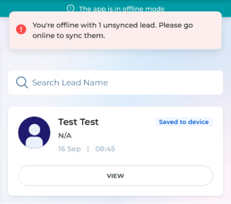
Offline scans are labeled “Saved to device” until they sync. A banner at the top of the app shows  how many leads still need to be synced and provides instructions to connect to the internet. 
Converge FAQ

Yes. You will be able to send follow-up emails directly through the Converge+ Scan app when you click on the lead. You can customize these emails during the setup process. 

Yes, you can attach files and edit the auto-generated emails before sending. 

You’ll get access to the Converge+ Scan app closer to the event. 

Lead capture remains available for 24 hours after the event ends. After that, you can no longer scan new leads or add lead data. 

You will still have access to view your existing leads in the Converge+ Scan app for 4 weeks after the event. We recommend using the Converge+ Insights dashboard to review, filter, and export your leads. 

Visit the Converge+ Support Desk onsite for assistance with setup, access, scanning, or lead retrieval. 

LEADS ACCESS 

Access Your Event Leads Post-Event 

Your company admin will receive an email two days post-event with an export of your leads.  

For real-time access to your leads, contact lvsouvenir.es@clarionevents.com for more information on our upgraded offerings! 

Check your spam or junk folder first for an email from [Event Name] Converge+ with the subject line: "Your Converge+ Post-Show Lead Export is Ready to Download". 

If unable to locate, contact lvsouvenir.es@clarionevents.com to assist. 

You’ll receive an export of lead details including contact info, job title, company name and address, email address, conversation notes, and lead scoring.  

Upgrades are available to unlock added features (personal dashboard, segmentation, AI-driven insights, etc.), real-time access to lead data with multiple team logins. Contact lvsouvenir.es@clarionevents.com if you’re interested in learning more about upgrades. 

Please contact lvsouvenir.es@clarionevents.com for assistance. 

Yes! You can access your leads in real-time beginning the first day of the event through our upgraded Insights dashboard. Contact lvsouvenir.es@clarionevents.com if you’re interested in more details or scheduling a live demo with our Converge+ expert. 

You’ll see lead scores, conversation summaries, engagement tags, and filters by role, location, and interest level. You can sort and export leads easily.  

Additionally, you’ll receive advanced analytics and segmentation of your target customers to help you prioritize and act quickly on lead follow-up.  

Contact lvsouvenir.es@clarionevents.com to schedule a live demo with our Converge+ expert. 

Data security is our top priority. All badge scans are encrypted, and our system prevents unauthorized third-party access. Converge+ is GDPR-compliant and follows industry best practices for data privacy. Data stays secure from capture to export.   

Still have questions? 

Contact your Exhibitor Services Team lvsouvenir.es@clarionevents.com.